
Enrollment & Registration
KSD Enrollment
THIS PROCESS IS ONLY FOR STUDENTS WHO ARE NEW TO KEARNEY SCHOOL DISTRICT. FOR CHILDREN WHO ATTENDED KSD IN THE 2025-2026 ACADEMIC YEAR, USE THE BACK-TO-SCHOOL REGISTRATION PROCESS AS RETURNING STUDENTS.
Welcome to Kearney School District! Whether you are transitioning from another district or beginning your child's first steps into school, we know it's important to make this process as easy and informative as possible.
PowerSchool Enrollment Express is our online enrollment platform. KSD will use this tool to gather information about new students to better serve their educational needs. Please click here to register your new student. Complete a separate registration form for each student you are enrolling.
If you have any questions, we encourage you to contact the building where your child will attend, email reghelp@ksdr1.net or call the Central Office at 816-628-4116.
Those wishing to submit a records transfer request should contact the school building the student last attended.
Back-to-School Registration Is Now Open!
THIS PROCESS IS ONLY FOR STUDENTS WHO ATTENDED KSD IN THE 2025-2026 ACADEMIC YEAR AND ARE RETURNING.
Back-to-School Registration is now available through the KSD's PowerSchool portal. Registration must be completed separately for each student in your household.
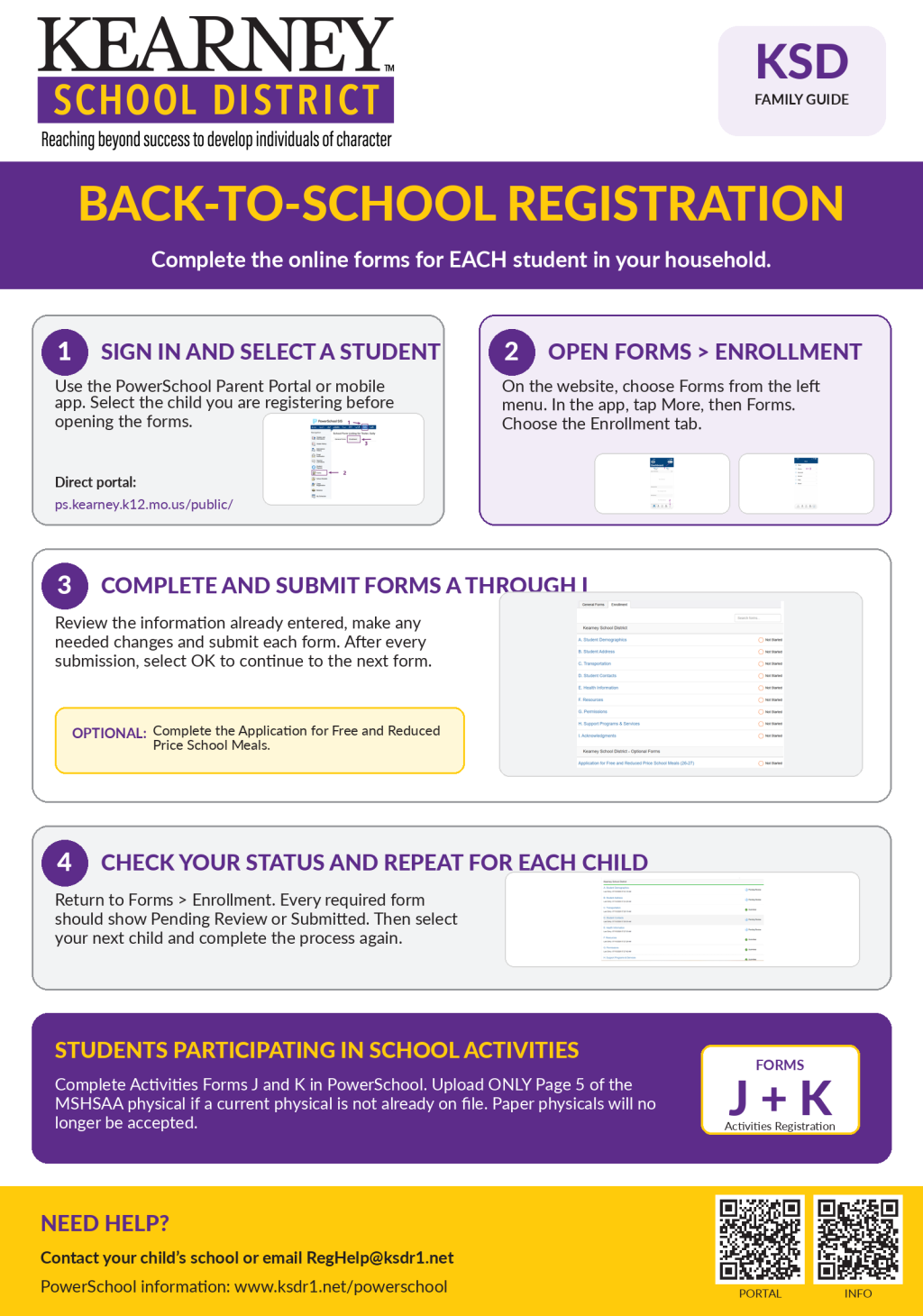 How to complete registration:
- Sign in to the PowerSchool Parent Portal or open the PowerSchool mobile app.
- Select the student you wish to register.
- Open Forms and select the Enrollment tab.
- Begin with A. Student Demographics and complete each form through I. Acknowledgements.
- Review the information already entered, make any needed changes and submit each form.
- Return to Forms > Enrollment and confirm that each required form is marked Pending Review or Submitted.
- Select your next student and repeat the process.
Families may also complete the optional Application for Free and Reduced Price School Meals through the Enrollment forms.
NOTE: The One2One Insurance registration only needs to be completed for students who will be entering grades 8-12 for the upcoming academic year. If applicable, you will receive the ID number for your child to register for One2One Insurance in a separate message at a later date when registration becomes available.
DOWNLOAD: KSD Back-to-School Process PDF
 Activities Registration
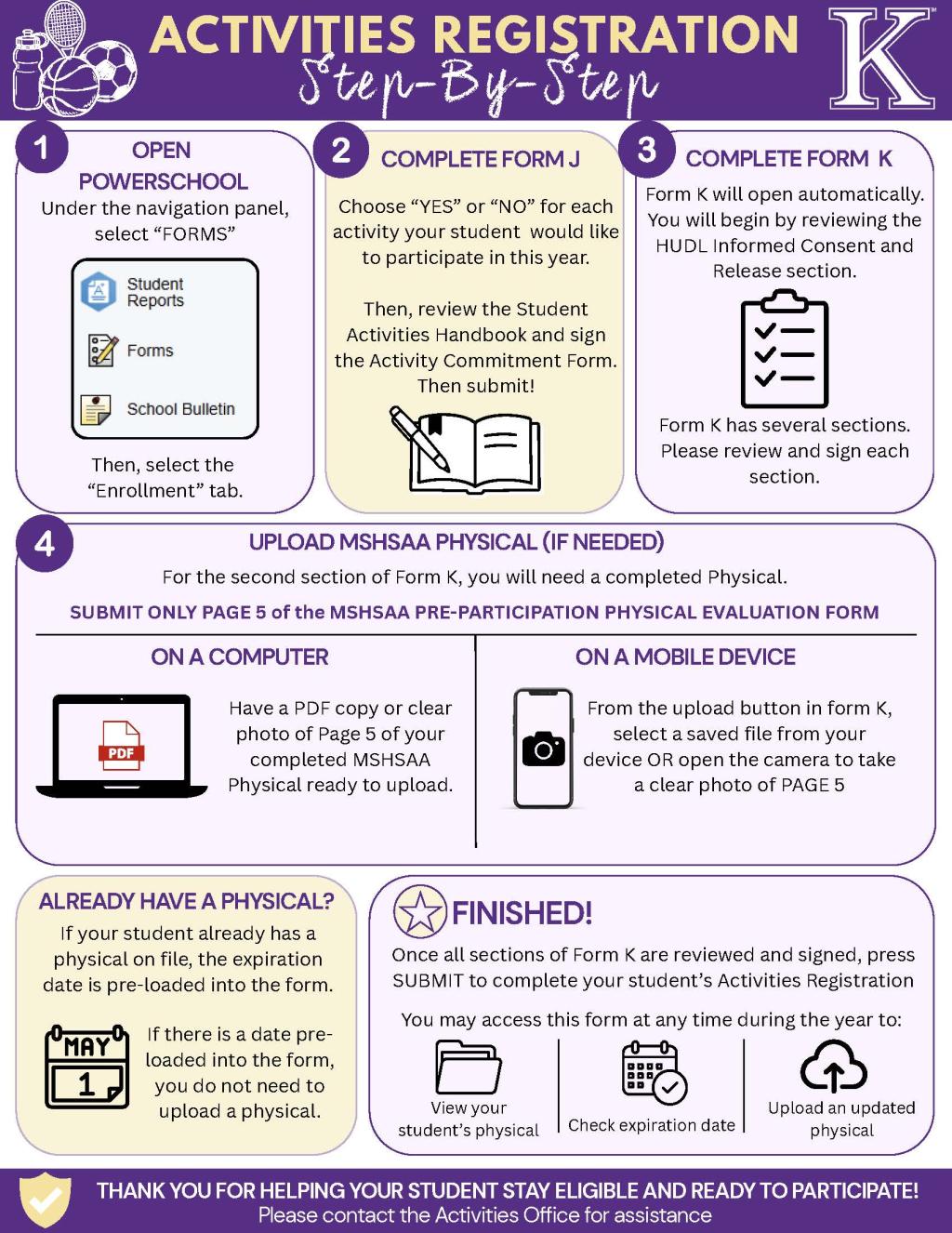
Students who plan to participate in fall sports or other school activities must also complete Activities Forms J and K in PowerSchool. If your student needs an updated MSHSAA physical, upload only Page 5 of the completed MSHSAA Pre-Participation Physical Evaluation Form. If a current physical is already on file, its expiration date will be preloaded, and you do not need to upload another copy.
The KSD Activities Office will no longer accept paper copies of MSHSAA physicals. Moving the process to PowerSchool also allows families to view physical expiration dates and upload updated documents throughout the year.
DOWNLOAD: Activities Registration Process PDF
PowerSchool access and assistance:
If you cannot access your PowerSchool account, please contact your child’s school or email RegHelp@ksdr1.net. Thank you for taking the time to review and update this important information for each of your students.
-
Step 1
Click the button below to start the enrollment process using PowerSchool Enrollment Express:
Information you will be asked to upload during your online process:
- Proof of Residency
- Parent/Guardian Photo Identification
The following is also necessary for enrollment and may be sent from the transferring school. You may also upload any of this documentation in PowerSchool Enrollment Express.
- Current Immunization Record (Must be electronic version from provider; handwritten cards may not be accepted)
- Birth Certificate
- Academic Records
- Special Services Documentation when applicable
Step 2
KSD staff will request records from the student's previous school. Records may include grades, test scores, attendance, discipline, health, immunization, A records, and special services, when applicable.
The district requires that certain records be in hand BEFORE the student starts school such as but not limited to immunization records, discipline, and special service records.
When KSD staff have received the records, they will contact you for the next steps. When you receive a call from your child's school, you will need to set up a time to visit. During this visit, you may pay lunch money, receive bus information, turn in medications, complete any building-specific forms, and visit with the school counselor for course information.
**Students may not attend the same day they are enrolled.**
-
- Change of Address Form for currently enrolled students.
- Proof of Residence Acceptable Documentation
- Student Transfer Request Form for Elementary Students within Kearney School District
- Free and Reduced-Price School Meal Application
-
Q. Do we have online enrollment?
A. Yes! PowerSchool Enrollment Express is our platform for collecting necessary enrollment documentation virtually.
Q. I do not have access to the internet. How can I enroll my child?
A. We are happy to assist you with this. Please call your child's school or 816-628-3187 for more information.
Q. What if I have questions during my online process?
A. Parents and Guardians may call your child's school or 816-628-3187 if they have any questions or concerns.
Q. Can my child start school the same day as enrolling?
A. All state and local enrollment requirements must be met before your child can begin school. It is likely that they will not begin class the same day.
Q. How will I as a parent know when my child has been approved to enroll?
A. If you have not already heard from your child's school, please contact school staff or call 816-628-3187 for further assistance.
Q. Is the process complete when the student arrives to their school building?
A. Not quite. You may still need to take care of some things such as lockers, lunch money etc.
Q. What if I do not have all the required documents to enroll my child, such as proof of residence or a birth certificate?
A. We will be glad to help guide you to the proper resources to obtain the documents you need. If it turns out that you do not meet such requirements, you may be denied enrollment until such documents can be obtained.
Q. I cannot upload my documents in Registration Gateway. What do I do?
A. Contact the building staff where your child will attend, and they will help you with an alternative.
Q. What if a current and/or new student would like to change their address?
A. All address changes require proof of residence; please turn those in with a change of address form to the building where your child attends. Forms are available in any building or on the website.
Q. Does this mean a new family cannot tour a building until after they have enrolled?
A. Not at all. Families who are interested in our district and would like a tour should contact staff in that building's office to set up a time. Same day tours may not be available.
Q. How do I find out which school my child will attend?
A. Kearney School District has one early education center (pre-K), four neighborhood elementary schools (grades K-5), one middle school (6-7), one junior high (8-9) and one high school (10-12). To find out which neighborhood elementary school your child will attend, please visit our interactive KSD School Boundary Map.
-
-
Kearney School District’s kindergarten enrollment opens on Monday, Feb. 2, for the 2026-2027 academic year. If you have a child who will be age five on or before July 31, 2026, this will be the time to enroll them in kindergarten!
We will email and post information about how to enroll on Feb. 2; updates will also be available on our website. Parents/guardians will be required to provide a birth certificate, a record of required immunizations and proof of residence for their child during kindergarten enrollment. Use our online district boundary map to locate the elementary school your child will attend.
After completing the enrollment process, one of our Parents As Teachers program Parent Educators will contact you to schedule a kindergarten screening. Parent Educators screen to help KSD plan for classes and the needs of each incoming kindergarten class. Parent Educators will also provide at-home activities and information about summer programs, as well as answer any questions parents/guardians may have.
All families are encouraged to fill out the Online Meal Application Form. Completing this form allows families to qualify for free and reduced meal prices and also allows KSD to potentially become eligible for additional academic resources and funding.
Kindergarten Orientation events will be held from 6 to 7 p.m. on Thursday, May 7, at each of KSD’s elementary schools. Stay tuned for details. This is an opportunity to receive helpful information about KSD, tour your school and meet your child’s teachers and building principal. We’re excited to welcome the Class of 2039!
-
Per Senate Bill 63 (SB 63), students in full-time home school, full-time virtual school, and Family Paced Education (FPE) schools can now participate in extracurricular and co-curricular activities in their public school of residence.
Effective August 28, 2025, SB 63 ensures that students who reside within Kearney School District’s attendance boundaries and who receive instruction outside of traditional public-school settings may still participate in district-sponsored athletics, fine arts and other co-curricular activities. These students are eligible to try out for and join school activities under the same standards as traditionally enrolled students, provided they meet all eligibility requirements.
Participation Requirements
- Reside within KSD’s attendance boundaries
- Adhere to eligibility standards, including academics, conduct, and completing a physical if required
- Pay applicable participation fees
- Be enrolled in the corresponding co-curricular classes, such as band or choir
- Adhere to the MSHSAA Citizenship by-laws and the "Self Report" requirement
- Parents must verify their student’s academic eligibility during each grade check period
Participation Process
Non-MSHSAA Activities (Grades K-12)
Use PowerSchool Enrollment Express to register the child and provide proof of residency, immunizations, etc. Once that process is completed and after the child’s residency is verified, KSD will provide more information about participating in non-MSHSAA activities. Please email our registration department if you have any questions.
MSHSAA Activities (Grades 6-12)
- Register the child and provide proof of residency, immunizations, etc.
- Complete a MSHSAA Physical Form and upload page 5 in PowerSchool Enrollment Express.
- Complete the MSHSAA Pre-Participation Annual Document in PowerSchool Enrollment Express.
- Complete the KSD Activities/Athletic Commitment Form in PowerSchool Enrollment Express.
- Complete the HUDL Consent in PowerSchool Enrollment Express.
After completing the steps detailed above, and after the child’s residency is verified, KSD’s Activities Department will provide more information about participating. New requests are checked once a week. Please email Registration Assistance if you have any questions.
IMPORTANT NOTE: Participation in some co-curricular activities, such as band and choir, requires the student to be enrolled in that activity’s associated academic class