
Back-to-School Resources
Back-to-School Resources
-
Back-to-School Events
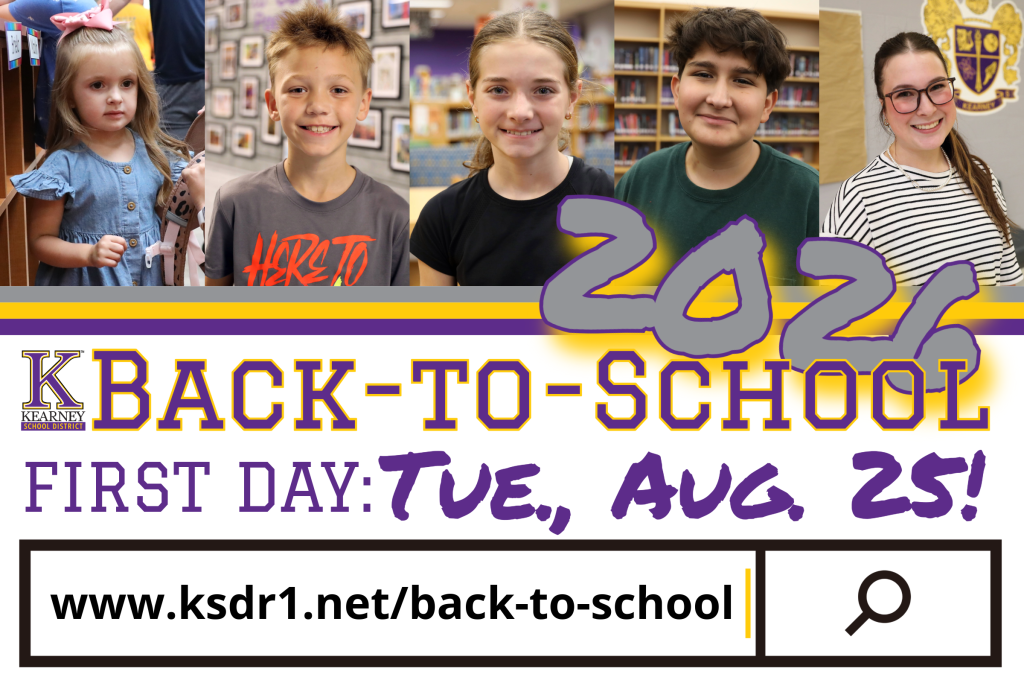
The first day of school will be Tuesday, Aug. 25. Please mark your calendars for the following important back-to-school dates.
Puppy Pound (KSD employees only)
- Back-to-School Open House - 12 to 1:30 p.m. Friday. Aug. 14
ECSE & 5-Day Pre-K
- Back-to-School Open House - 4 to 5:30 p.m. Thursday, Aug. 20
Elementary Schools
- Back-to-School Open House - 5 to 6:30 p.m. Thursday, Aug. 20
KMS
- 6th-Grade Transition - 8 to 11 a.m. & 12 to 3 p.m. Wednesday, Aug. 12
- 7th-Grade Schedule Pick-Up - 9:30 to 11:30 a.m. & 12:30 to 2:30 p.m. Thursday, Aug. 13
- Schedule Pick-Up As Needed - Friday, Aug. 14
- Back-to-School Open House - 5:30 to 7 p.m. Thursday, Aug. 20
KJH
- 8th-Grade Transition (Last Name A-L) - 8 to 9:30 a.m. Thursday, Aug. 13
- 8th-Grade Transition (Last Name M-Z) - 10 to 11:30 a.m. Thursday, Aug. 13
- 9th-Grade Schedule Pick-Up - 12:30 to 3 p.m. Thursday, Aug. 13
- Back-to-School Open House - 6 to 7:30 p.m. Thursday, Aug. 20
KHS
- 11th-Grade Schedule Pick-Up - 9:30 to 11:30 a.m. & 12:30 to 2:30 p.m. Wednesday, Aug. 12
- 12th-Grade Schedule Pick-Up - 9:30 to 11:30 a.m. & 12:30 to 2:30 p.m. Wednesday, Aug. 12
- 10th-Grade Orientation/Schedule Pick-Up - 10:30 a.m. to 12:30 p.m. Thursday, Aug. 13
- Back-to-School Open House - 6:30 to 8 p.m. Thursday, Aug. 20
-
Back-to-School Registration Is Now Open!
THIS PROCESS IS ONLY FOR STUDENTS WHO ATTENDED KSD IN THE 2025-2026 ACADEMIC YEAR AND ARE RETURNING.
Back-to-School Registration is now available through the KSD's PowerSchool portal. Registration must be completed separately for each student in your household.
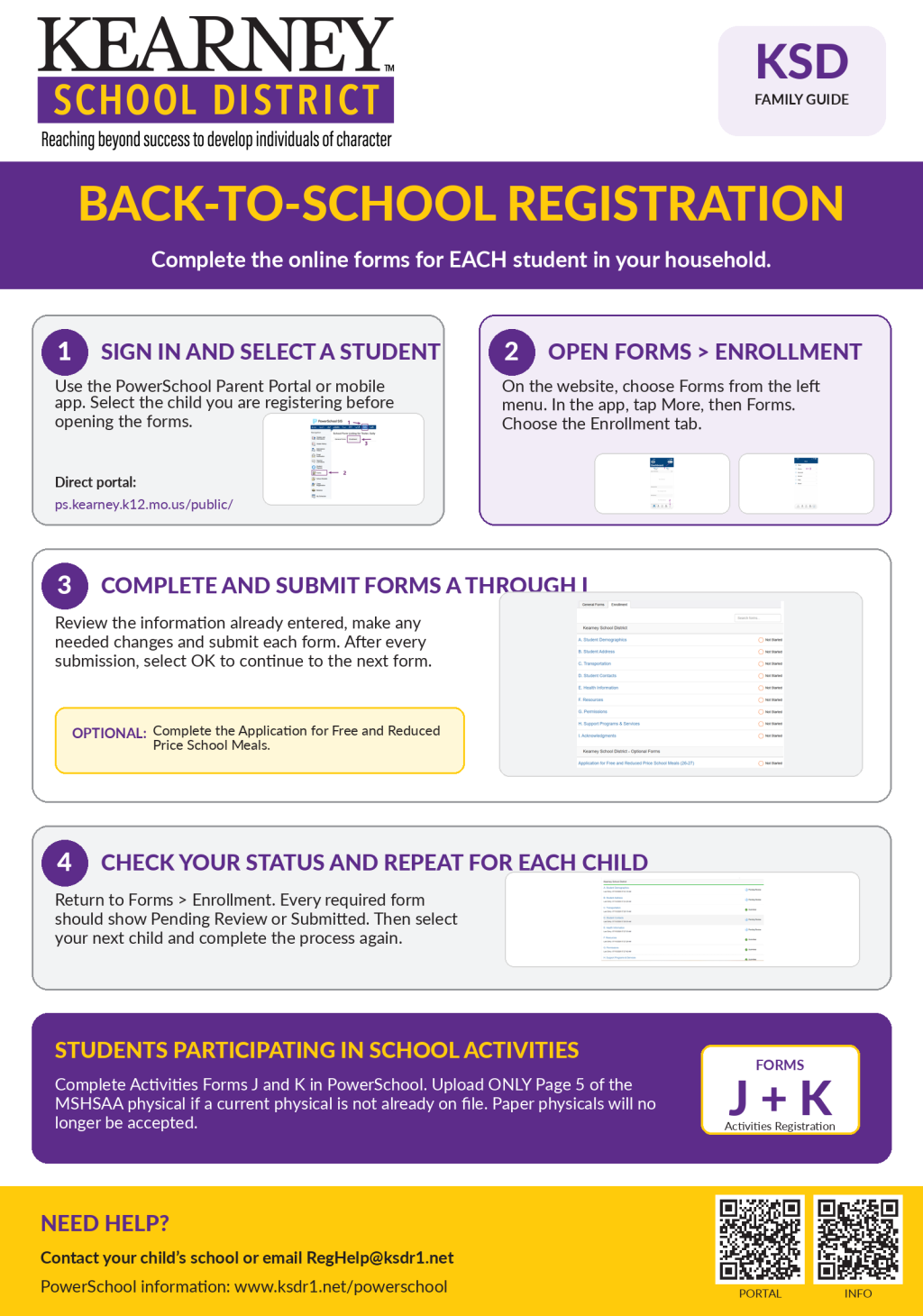 How to complete registration:
- Sign in to the PowerSchool Parent Portal or open the PowerSchool mobile app.
- Select the student you wish to register.
- Open Forms and select the Enrollment tab.
- Begin with A. Student Demographics and complete each form through I. Acknowledgements.
- Review the information already entered, make any needed changes and submit each form.
- Return to Forms > Enrollment and confirm that each required form is marked Pending Review or Submitted.
- Select your next student and repeat the process.
Families may also complete the optional Application for Free and Reduced Price School Meals through the Enrollment forms.
NOTE: The One2One Insurance registration only needs to be completed for students who will be entering grades 8-12 for the upcoming academic year. If applicable, you will receive the ID number for your child to register for One2One Insurance in a separate message at a later date when registration becomes available.DOWNLOAD: KSD Back-to-School Process PDF
 Activities Registration
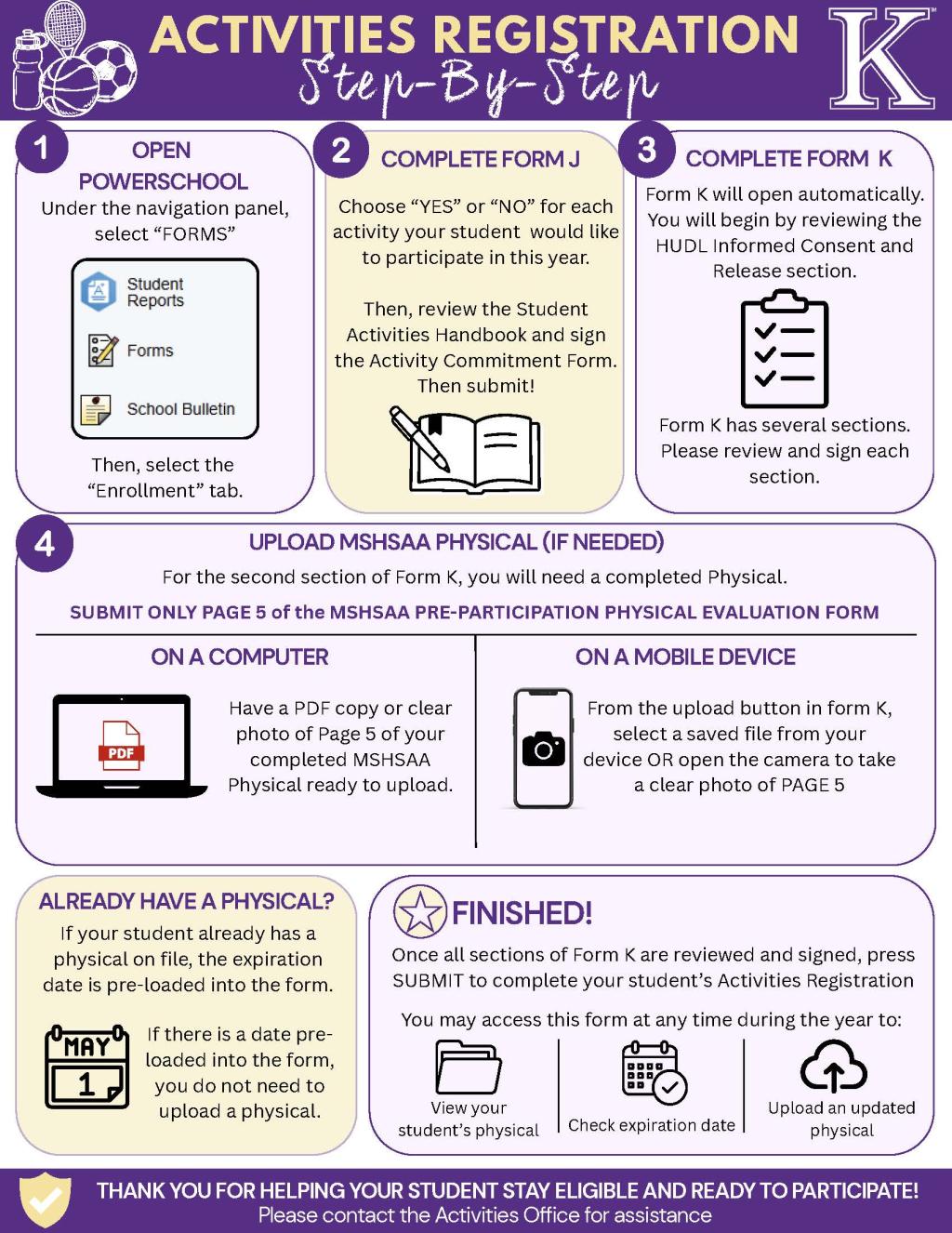
Students who plan to participate in fall sports or other school activities must also complete Activities Forms J and K in PowerSchool. If your student needs an updated MSHSAA physical, upload only Page 5 of the completed MSHSAA Pre-Participation Physical Evaluation Form. If a current physical is already on file, its expiration date will be preloaded, and you do not need to upload another copy.
The KSD Activities Office will no longer accept paper copies of MSHSAA physicals. Moving the process to PowerSchool also allows families to view physical expiration dates and upload updated documents throughout the year.DOWNLOAD: Activities Registration Process PDF
PowerSchool access and assistance:
If you cannot access your PowerSchool account, please contact your child’s school or email RegHelp@ksdr1.net. Thank you for taking the time to review and update this important information for each of your students.
-

Kearney School District families are encouraged to sign up now for the 2026 Resource Fair!
This annual event helps KSD students and families get ready for the start of a new school year by connecting them with school supplies, clothing and other helpful resources. Last year’s Resource Fair served 285 students, one of the highest turnouts since COVID. We are excited to continue working together to make sure every Bulldog has a strong start to the school year.
The 2026 Resource Fair will be held at Kearney Junior High:
- 4 to 7 p.m. Thursday, Aug. 13
- 9 to 11:30 a.m. Friday, Aug. 14
Pre-register online today at: www.ksdr1.net/resourcefair
Thank you to our KSD social workers, counselors, staff members and community volunteers who help make this event possible each year. Their work reflects the very best of what it means to be part of Team KSD: showing up for kids, supporting families and helping our students feel ready for the first day of school.
Please pre-register today and help us spread the word to any KSD family who may benefit from this opportunity.
DOWNLOAD – 2026 Back-to-School Resource Fair Flyer
-
Student Handbooks
Kearney School District’s 2026-2027 Student-Parent Handbooks, reviewed and approved by the Board of Education on June 18, 2026, provide families with important information about district practices, policies, procedures and expectations. Students and parents/guardians are encouraged to review their school’s handbook so we can work together to support safe, successful learning environments throughout KSD.
-
1:1 Device Insurance
KSD provides all students with access to digital devices for classwork as appropriate. Starting in the 2026-2027 academic year, students in sixth and seventh grade will continue to have access to Chromebooks when they need them for learning during the school day. However, KMS will no longer issue a Chromebook to each student to keep and take home for the entire school year. Instead, students will use devices that are assigned by classroom and remain at school.
Chromebooks will continue to be issued to each student in grades 8-12. Families of those students are required to register for district device insurance if their student is going to take the device home. KSD offers this insurance program at a minimal cost to protect against accidental damage to these devices.
This insurance is strongly recommended. If parents/guardians do not register for the insurance program, the student’s parents/guardians will be responsible for the full cost of any damage to their KSD-issued device, including any damage that occurs while the device is at school.
- Insurance program coverage, fees, and deductible information
- 1:1 Program Frequently Asked Questions
To enroll in the 1:1 insurance program, please visit the One2One Risk site and enter the Student ID when prompted.
PLEASE NOTE: The 1:1 insurance registration process must be completed separately for each student
-
Immunizations
All children who are enrolled in KSD must be in compliance with Missouri’s current immunization laws and regulations:
- 2026-2027 Missouri School Immunization Requirements
- Requisitos de vacunación escolar de Misuri 2026-2027
- Vaccines for Children – Information for Parents
Those immunization records must be on file with your child’s school nurse. If the child has actually had their scheduled immunizations, please obtain a letter, statement, or record from your health provider showing each dose of vaccine and the full date (month/day/year) administered. The law provides that students not in compliance with these requirements must be excluded from school until the student provides verification of the immunizations received, has a scheduled plan signed by the physician, or obtains an exemption signed according to the provisions of the law. Visit our Health Services webpage to learn more.
-
Kearney School District contracts with Durham School Services for bus management and operations. The Bus Barn can normally be reached from 6 a.m. to 5 p.m. Monday-Friday at (816) 628-9003. If you are not able to reach anyone at that number, please call our central office at (816) 628-4116 or email communications@ksdr1.net.
Please use the link below to view our 2025-2026 bus routes and schedules. Families with children who are new to KSD or who have not been school bus riders before should call Durham School Services to confirm their routes.
LINK – 2025-2026 KSD Bus Routes & Schedules
BusZone App for KSD Families
Durham School Services offers a convenient mobile app for our families: BusZone. BusZone has enhanced features that allow parents/guardians to safely and securely check on their child's school bus.
Set up BusZone:
- Download the BusZone app from the App Store or Google Play.
- Enter the School Access Code: 3033KSD
- In the search field, enter the bus or route number you want to follow. Complete this step for all the buses your students ride throughout the week.
- Enter the unique student ID for your student
- Create alert zones around drop-off and pick-up points.
DOWNLOAD: BusZone Info Flyer
When your child’s bus enters an alert zone, you will receive a notification by email or text. You will need to go through this process separately for each of your children who are enrolled in our schools.
Visit the BusZone website to read or download a guide for parents/guardians. Kearney School District is not responsible for the functions or content of BusZone. Please email buszone3033@nellc.com if you have questions about the BusZone app.
-
Please check this page for links to our updated school supply lists.
- Elementary School Supply List
- Kearney Middle School Supply List
- Kearney Junior High School Supply List
- High School Supply List: Supply lists will be provided to high school students by teachers on the first day of school. Paper, a pencil and a pen will be sufficient for the first day of classes.
-
-
Early Education Center
- Session 1 - 8:30 to 11:30 a.m.
- Session 2 - 12:30 to 3:30 p.m.
Elementary Schools
- Regular Schedule - 8:35 a.m. to 3:25 p.m.
- 2-Hour Early Out - 8:35 a.m. to 1:25 p.m.
- Half-Day - 8:35 to 11:35 a.m.
- 2-Hour Delayed Start - 10:35 a.m. to 3:25 p.m.
Kearney Middle, Junior and High School
- Regular Schedule - 7:30 a.m. to 2:20 p.m.
- 2-Hour Early Out - 7:30 a.m. to 12:20 p.m.
- Half-Day - 7:30 to 10:30 a.m.
- 2-Hour Delayed Start - 9:30 a.m. to 2:20 p.m.
-
All families are encouraged to fill out the Application for Free and Reduced Price School Meals through the PowerSchool Parent Portal (under Forms > Enrollment). Completing this form allows families to qualify for free and reduced meal prices and also allows KSD to potentially become eligible for additional academic resources and funding. Meal payments can be made through RevTrak or cash/checks can be sent in; these payments can be made anytime.
2026-2027 Prices Grades Pre-K-5 Grades 6-12 Adult, Child Visitor & Second Student Meal Breakfast $2.25 $2.25 $2.25 Lunch $2.95 $3.05 TBD Extra Milk 55 cents 55 cents 55 cents -
Statistics consistently show that schools are among the safest places to be due to the strong commitment of educators, families, and our community to our students and schools. We strive to be proactive rather than reactive. This guide outlines the key elements of the state of preparedness in Kearney School District. We hope it will answer questions you have concerning our actions and intentions in the event of an emergency.
Terms
For consistency, we have developed the following terms to use:
- Drill: An activity that covers a specific safety circumstance and is designed to prepare your student to act quickly and minimize questions and fears should an emergency take place. State law requires fire, tornado, and other emergency drills, including an unannounced lockdown.
- SRO: School Resource Officer, a trained, certified and uniformed law enforcement officer assigned to schools to help build and maintain relationships between police, students, families, and employees.
- Lock and Teach: Lock and Teach is the term used when a non-threatening situation is in or around the building. Students remain in the classroom and class can go on as planned.
- Lockdown: Lockdown is the term used when there is a dangerous threat in close proximity of the building but is not inside the building. Occupants are kept in rooms or areas that are secured. There is no movement within the building. Lockdown procedures are followed.
- A.L.I.C.E.: Alert, Lockdown, Inform, Counter, Evacuate (A.L.I.C.E.) is the safety training staff and students undergo in their buildings. A.L.I.C.E. is the term used in the event of an intruder in a building.
- Shelter-In-Place: All occupants remain in the classroom/building. Movement within the building is at the building administrator’s discretion.
- Evacuation: Evacuation is the term used when a dangerous threat is in the building. Students and staff need to get out of the building.
- Rally Point: Area where students and employees are transported.
- Reunification Point: Location designated at a school or reunification site where families may pick up students. This location will be communicated to you at the time of an emergency.
Contact Info
As soon as possible, please ensure your contact information in PowerSchool is current and accurate, including who is authorized to pick up your student. We will use this information and multiple communication channels (phone calls, emails, text messages) to provide accurate and timely information in the event of an emergency.
If necessary, we may also use our district and school website, social media accounts and local news outlets to share important and timely information.
Explain to your student that cell phones should not be used during an emergency unless directed by an adult. Your student must pay attention to instructions from trained personnel.
What to Expect
During an emergency:
- The emergency plan will be implemented and the district/school emergency teams will respond.
- All appropriate emergency response agencies will be dispatched to the school.
- Depending on the situation, students and employees will be secured within the building or relocated to a Rally Point and Reunification Point.
- Families will be kept informed on the situation with as much detail as possible. The first and official way for us to contact you in an emergency is using our automated SchoolMessenger system. Please only rely on these official communications.
- In an emergency, phones are needed to manage the situation and lines must remain open. Calling could also put students and employees at risk in an intruder situation. For example, if they did not have time to turn down their ring volume, your call could potentially give away their hiding spot.
- You will not be allowed on school grounds during an emergency. Emergency personnel responding to the situation need the area clear to do their job. After emergency responders determine that a safe student release is possible, arrangements will be made to reunite students with their families. This will occur at a reunification site.
- Students will not be allowed to take their property (coat, backpack, etc.) with them in an emergency.
After an Emergency:
- You will be directed to the Reunification Point, and you will need photo identification.
- Students will only be released to a parent, guardian, or other adult listed on the student’s PowerSchool account. The individual picking up the student will be asked to sign a Student Release Form. This procedure is designed for your student’s protection and your peace of mind.
- Please be aware that reunification can be very time-consuming, and we appreciate your patience.
- It is important to remain calm as students are greatly influenced by their family’s sense of well-being. At the same time, families need to be compassionate listeners when their student speaks of an emergency. Please seek help from the school, district, or community resources if you/your student have concerns.
Press Pause
Families should be aware that Kearney School District will ask students and employees to “Press Pause,” or wait five minutes before communicating (calling, texting, posting, tweeting) in an emergency to give authorities sufficient time to assess the situation and communicate accurate information. This helps to avoid an environment that shares misinformation, which may escalate a situation. Teachers and/or administrators will give students the “green light” to utilize their devices.
Additionally, all Kearney School District employees, students, families, and community members are encouraged to report anything they see, hear, or are made aware of that may impact a school. If you see or hear something, say something. All KSD staff are trained to respond appropriately when they hear about potentially concerning situations. Anonymous tips can be shared using the Scholastic Crime Stoppers program by calling (816) 474-TIPS or visiting the Crime Stoppers website. KSD SRO Adam Kirkland can be reached at kirklanda@ksdr1.net. Call 911 if there is an immediate threat.
When providing information, please be as detailed as possible. Include the name of the school(s), person(s) involved, type of alleged activities, and when they occurred/may occur.
All threats are taken seriously. Police are notified, and officers and school administrators work together to thoroughly investigate any threat, whether it is made verbally, in writing, email, text message, or online. The earlier we know about a potential threat, the earlier an investigation can begin.
Anyone who makes a threat against a school could face criminal charges. If a student is involved in making a threat, the school/district will respond as outlined in the student handbook.
WARNING: it is forbidden to impersonate an official Kearney School District social media account or post false information about or from the school system under an anonymous account or alias. Depending on the nature of the post, such action may result in notification to local law enforcement. If made by an employee or student, it could result in disciplinary action.
The way in which we respond to an emergency is greatly influenced by the specifics of an incident. Our plans do not replace the authority of emergency personnel. Our employees work in full cooperation with these agencies.
For security reasons, components of our emergency plans are not publicly available.